Open the Capabilities page
Open it from the command palette (press Cmd+K, then choose Skills, Agents, or Apps), or from your org’s navigation. The page has five sections: Skills, Agents, Tools, Apps, and Build.Build defaults
Capabilities → Build holds the defaults agents use when a turn does not say otherwise. Default organization and Default repository decide where agents work. Environment variables carry the credentials a run needs: create an environment, then add variables or paste a complete .env file. Opening Settings → Build redirects here.Create a skill
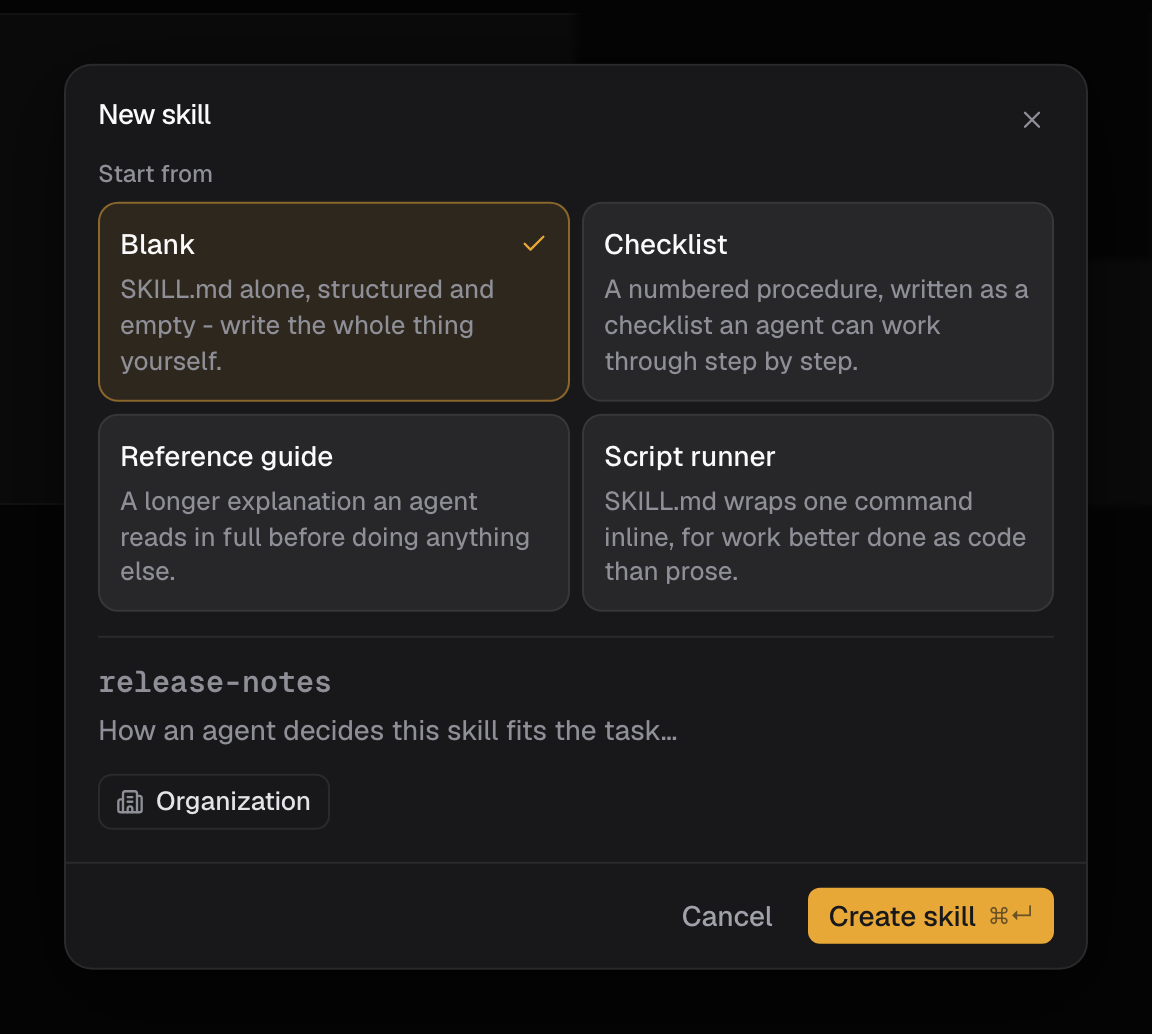
- On Capabilities → Skills, select New skill.
- Name it: up to 48 characters, lowercase letters, numbers, and hyphens, like
release-notes. - Add a one-line description that says when the skill fits, up to 160 characters. Agents read this to decide whether to apply it.
- Choose Organization or Private visibility.
- Pick a starting template: Blank, Checklist, Reference guide, or Script runner.
- Select Create skill, then open the skill and write its instructions in the SKILL.md editor. Save when the draft is solid.
/ menu.
Use the library filters to review availability: skills carry Organization or Private visibility and an enabled or disabled state. Your own skills live in the library; the skills that ship with Bright appear in the / menu.
Skills that ship with Bright
Type/ in any composer to see every skill that fits where you are. Connector-gated skills appear once the matching app is connected; see Connect apps.
Reach for forge when the result needs an independent verdict on the record, and sdlc when you are coordinating dependent stages across several owners. See Forge.
Create a named agent
- On Capabilities → Agents, select New agent.
- Give it a Handle, a short slug you will @ mention, like
release-captain. - Write a one-line role (up to 48 characters) that says what it is for.
- Write its instructions: how this agent should approach its work.
- Choose Organization or Private visibility.
- Select Create agent. Turn it on or off from the switch on its row.
@ in a composer to mention an agent by handle, for example @release-captain. The Agents section is where you create, edit, enable, or delete custom agents; starting one happens by @ mention in a composer.
The shipped roster, Bright and its seven specialists, is covered in Agents. For how to brief a specialist without inheriting its assumptions, see Use specialists.
Good to know
- The Capabilities page has five sections: Skills, Agents, Tools, Apps, and Build. Build holds the default organization, default repository, and environment variables.
- A skill name is up to 48 characters of lowercase letters, numbers, and hyphens. Its description is up to 160 characters.
- A named agent’s role line is up to 48 characters.
- The New skill dialog has no instructions field. It creates a bundle with a single SKILL.md, which you edit after creating.
- Skills and named agents both carry Organization or Private visibility and an enabled or disabled state. A named agent is turned on or off from the switch on its row.
- Bright ships 19 skills, listed in the table above. Connector-gated ones appear only after the matching app is connected.
- The shipped agent roster is Bright and its seven specialists.