1. Start in Ask mode
You are gathering, not committing. Ask mode cannot create issues, documents, or plans, so you can explore without watching for side effects. Workspace reads need no approval. A connector read can still show an approval card, so read it and allow it once.2. Pick the right instrument
Three shipped options, three different jobs:
This one is consequential and hard to reverse, so it wants Advisor, with /research run first if the evidence base is thin.
Switch the model selector to Genius for the pass that decides. Leave it on Standard for lookups.
3. Ask for the shape of an answer, not the answer
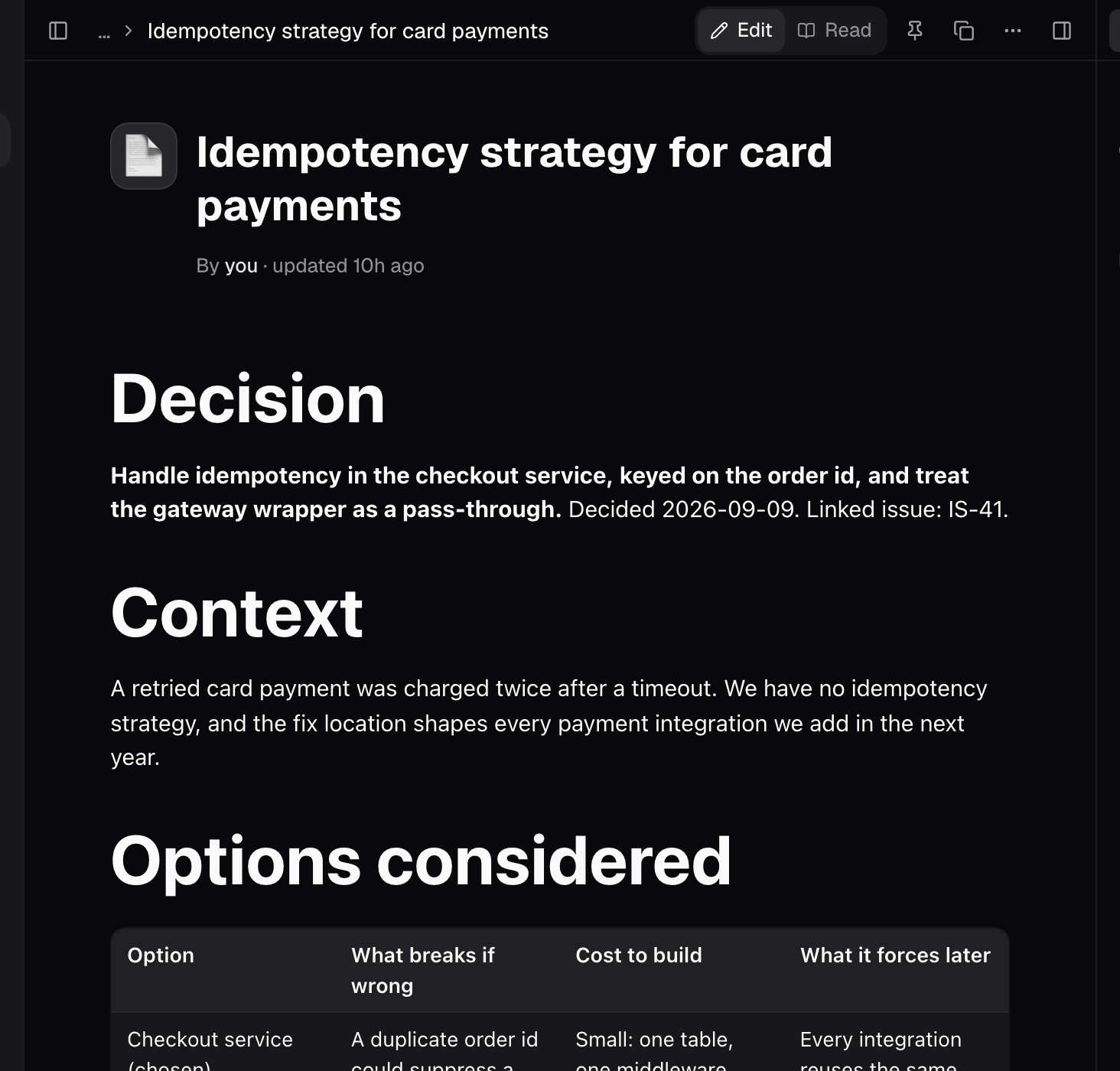
A prompt that produces something you can act on:4. Switch to Agent mode
Ask mode answers and changes nothing, so it cannot write the document. Open the composer’s Mode selector (Cmd+.) and choose Agent. Plan mode is not enough: it proposes before touching anything and never writes.5. Move it out of the chat immediately
Chat is where the thinking happened; it is not where it lives. Ask the agent to write the decision into a document. This is also the only reliable way to produce an artifact. The Artifacts library registers something when an agent creates durable output, not when a conversation is merely substantial. A long, excellent chat answer registers nothing. The write pauses for a tool approval. That is the system working; read the card, confirm it is writing where you expect, and allow it once.6. Structure the document so it survives
Six months later the reader is someone who was not in the room. Use the block editor (/ on an empty line opens the menu):
Docs keeps no version history and offers no restore. A deletion cascades to every child document and cannot be undone. Duplicate before any edit you are unsure about; this is the one surface where that habit matters.
7. Link it to the work
Open the issue, press Add in the Links section, choose the document kind, pick the document, and select Add link. The reasoning then sits beside the work it produced. Whoever opens the issue, plans it, or picks it up in a session starts from the decision instead of rediscovering it.What good looks like
- The decision is one sentence at the top of a document, not buried in chat.
- Assumptions are visibly separated from verified facts.
- The rejected option is recorded with its reason.
- The document is linked from the issue’s Links section.
- There is a stated trigger for revisiting it.
Good to know
- Ask mode cannot create issues, documents, or plans, so the research in steps 1 to 3 writes nothing. Workspace reads need no approval; a connector read can still show a card.
- Switch the Mode selector (Cmd+.) to Agent before asking for the document. Plan mode never writes.
- /research is expensive. Use it deliberately, and only when the evidence base is thin.
- Genius is switched on in the model selector. Leave Standard on for lookups.
- The Artifacts library registers durable output an agent creates. A chat answer alone registers nothing.
- Writing the document pauses for a tool approval. Read the card and allow it once.
- Docs keeps no version history and offers no restore. A deletion cascades to every child document and cannot be undone.
/on an empty line opens the block menu.
Related pages
- Turn a support escalation into planned work: get the underlying bug to a scoped issue first.
- Ask mode: read-only research, step by step.
- Work a long document: when the decision has to answer a spec, not just a bug.