Profile
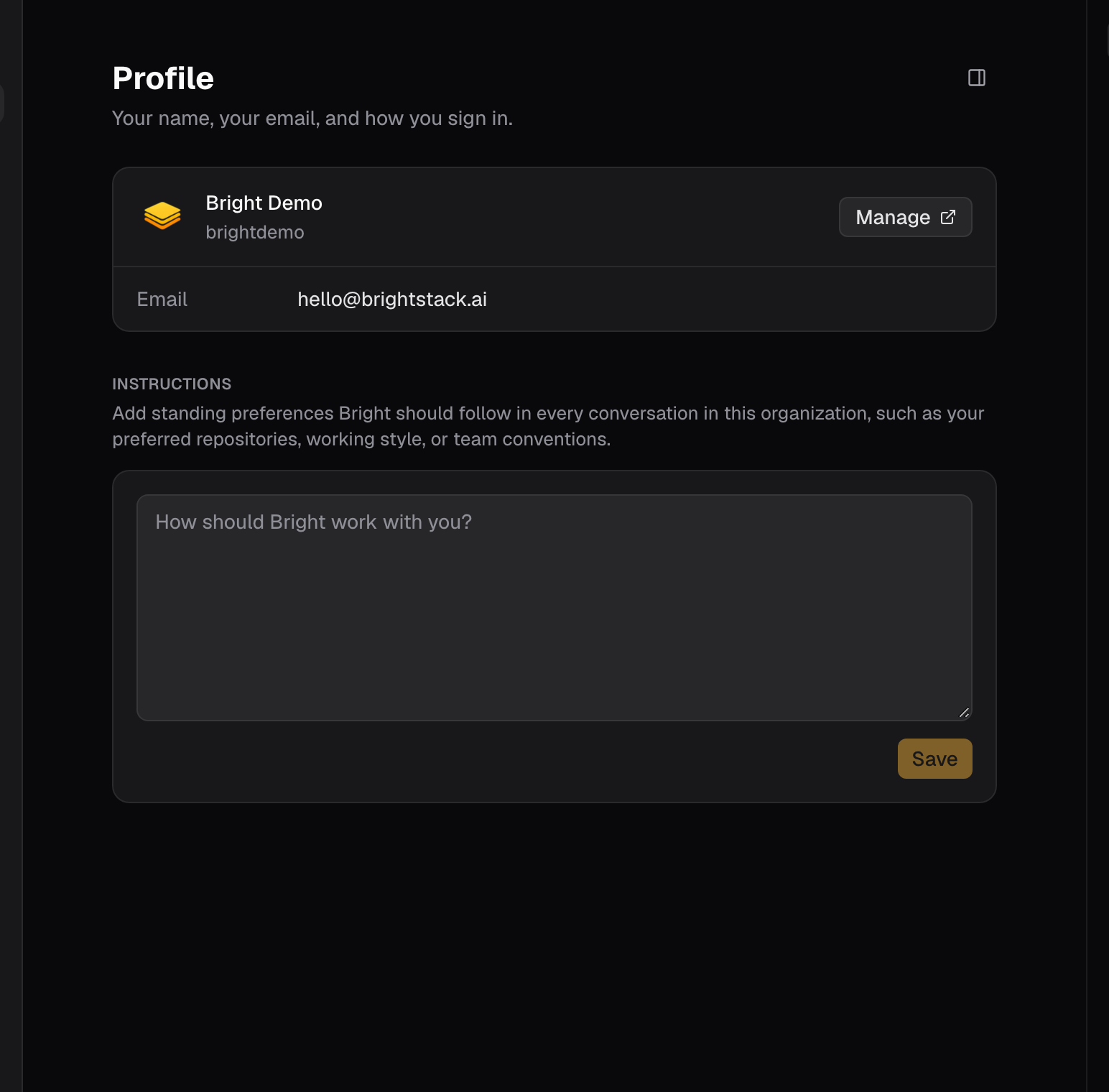
- Account shows your signed-in identity. Manage opens account and sign-in management.
- Instructions holds standing guidance that every session in this organization receives, up to 2,000 characters. The box is scoped to this organization: a teammate keeps their own, and your other organizations keep theirs.
- If you leave the page with unsaved edits, Bright asks before discarding them. Saving an empty box clears the instructions with no further prompt.
Build defaults live elsewhere
Default organization, default repository, and environment variables are on Capabilities → Build, and opening Settings → Build redirects there. See Build skills and named agents.Organization
The screen opens with the organization’s name, its member and pending-invite counts, and an Advanced control for the full organization settings. Members lists everyone with a role selector (Member or Admin) and a remove control. You cannot remove yourself.Invite a teammate
- Open Settings → Organization.
- Under Invite a teammate, enter the person’s email address.
- Pick a role. Member is the default; choose Admin for someone who will manage the organization.
- Select Send invite. Bright confirms with “Invitation sent.”
- Until it is accepted, the invite sits under Open invitations, where Revoke withdraws it.
What each role can do
Members see the Admin-only controls disabled rather than hidden.
Labels
Create, rename, recolor, and delete the labels issues use. Label hygiene is cheaper here than in the issue list: retire labels nothing uses before someone filters by them.Doc tags
The Tags section manages the tags that organize documents. Names run up to 32 characters.Billing
The Billing screen has three parts. Plans, prices, and limits change; read them on the screen rather than from any page that quotes them, including this one.- Usage shows your current plan and its price per month, the reset date with a countdown, and a usage meter as a percentage. Manage plan opens billing management.
- Credits shows your current balance, with a Buy credits control.
- Auto-reload adds a set amount whenever the balance falls below a minimum, up to an optional maximum monthly spend. Turn it on with the switch; Edit changes the amounts.
Tips
- If guidance should shape every future session in this organization, put it in Profile instructions: communication style, standing technical context, the conventions the team works by.
- If guidance applies only to the task in front of you, say it in the chat instead.
- Retire labels nothing uses before someone filters by them.
Good to know
- Profile instructions hold up to 2,000 characters and are scoped to one organization. Saving an empty box clears them without a prompt.
- Build defaults (default organization, default repository, environment variables) are on Capabilities → Build, not in Settings.
- Doc tag names run up to 32 characters.
- Organization roles are Member or Admin. Only Admins can invite, revoke invites, change roles, remove members, or change Billing.
- Billing shows your plan and usage meter, a credit balance with Buy credits, and Auto-reload.
- Plans, prices, and limits change; read them on the Billing screen.
- Related references: Terminology, Issue properties reference, Troubleshooting checklist.